- Basic CLI commands
- Vim Cheatsheet
- Standard Library Functions
- Lecture 2
- Lecture 3
- Data Types in C
- Sizeof()
- Computer Representation of Numbers
- Operator Gotchas
- Expressions vs Statements
- Storage Classes
- Memory Address Space
- Pointers
- Arrays
- Heap
- Strings
- Structs
- Unions
- Typdef
- Libraries
- IO
- Files
Class Information
-
Exams:
- Exam 1: Oct 12
- Exam 2: Nov 2
- Exam 3: Dec 7
- No Final
-
Grading:
- Labs: 25%
- Lowest lab score is dropped
- Soft deadline, with hard deadline 2 days later
- You have 7 late days total, up to 2 can be used for a single lab
- If you submit within 24 hours, you use 1 late day
- If you submit between 24 and 48 hours late, you use 2 late days
- After 48 hours, no submission will be accepted
- Can check late days:
/home/w3157/submit/check-late-days
- Exams (25% each)
- Labs: 25%
-
C Programming Language, by Kernighan and Ritchie
Homework Submission
-
See here for submission instructions
-
Important rules:
- remember to
git cloneinstead ofgit initto copy the labs - Run the submit script to submit the lab patch file
- Always check after submission wheather everything compiles in the submission directory that the script created
- remember to
Basic CLI commands
-
cat: show contents of file-nflag specified line numbers-tshows tab characters explicitly-eshows end of line
-
ls: show contents of directory -
rm: delete a file -
rmdir: remove a directory -
mv: move a folder or a file -
cp: copy a file or a folder (use-rflag to copy a folder) -
touch: updates the access and modification time to the current time. Will create an empty file if it doesn’t exist -
mkdir: create a directory -
echo: print the arguments -
pwd: show the name of the current working directory -
cd: change directory -
ls: list contents of directory -
clear: clear terminal screen -
exit: log out of shell -
man: look up manual pages for commands -
arexamine .a (archive files) (for debugging linker errors) -
nmexamine the symbols in a .a/.o file (for debugging linker errors)
Vim Cheatsheet
-
:qClose files -
:wSave file -
ZZSave and quit -
iInsert mode -
\<string>Find command<string>is the search string- Can jump to next result by hitting
nfor forward orNfor backwards
-
:[range]s/{pattern}/{string}/[flags]Find and Replace[range]is what lines you want to search in. Pass%to find and replace in all lines{pattern}indicates what pattern to find. Can use regex{string}is what to replace in the found text[flags]- c asks for confirmation before replacing
- i means case insensitive search
-
Shift {andShift }Jump up to next blank line or jump down to next blank line -
Use
:e <fname>to open up another file -
Can see all open files with
:ls -
Can switch between buffers with
:bn- Can specify specific buffer with
:b#where # is the buffer number
- Can specify specific buffer with
-
:ClangFormatUtilize clang-format to prettify the code (need clang for this)
Standard Library Functions
| Function | Description | Gotchas |
|---|---|---|
size_t strlen(const char *s) |
calculates length of string pointed to by s | Excludes null terminator ‘\0’ from length |
void strcpy(char *dest, char *source) |
Copies string from source to dest | dest must be large enough to accommodate source (buffer overflow otherwise) |
char *strncpy(char *dest, const char *src, size_t n) |
Safer version of strcpy. Copies from src to dest, but copies exactly n bytes | If dest is too small to fit all of source, then no null terminator will be added. If source is smaller than dest, then additional ‘\0’ will be copied to ensure n bytes are created in dest |
void qsort(void *base, size_t nmemb, size_t size, int (*compar)(const void *, const void *)) |
given the start of some data base, the size of each element size, and the number of elements nmemb, sorts each element according to comparision function compar |
If two members are equal, then sorted order is undefined (but probably still valid) |
FILE *fopen(const char *pathname, const char *mode) |
open a file at pathname in the associated mode. Returns NULL if fails |
Modes are “r” for read (fails if file doesnt exist), “w” for write (overwrites files if does exist. Create file if it doesn’t exist), “a” for append (writes to end of files if exists. Otherwise, create file). Can modulate all of the above with “+” (enables reading and writing, but keeps secondary effects of each mode) or with “b” (interpret data as binary data (Only useful on windows)) |
int fclose(FILE *stream) |
Closes a file pointer. Returns non-zero on error | Only call once if you fopen a stream |
int fprintf(FILE *stream, const char *format, ...) |
Write formatted text to file stream. Variadic arguments suppy format arguments | NA |
int fputs(const char *s, FILE *stream) |
Write string s to stream |
Null terminator is NOT pushed into stream. Will segfault if not properly null terminated |
int fputc(int c, FILE *stream) |
Push character into file stream | NA |
size_t fwrite(const void *ptr, size_t size, size_t nmemb, FILE *stream) |
Function to write arbitrary bytes to a file stream. Starting from address ptr, writes nmemb units each of byte size size to stream |
If you can’t write n objects, ferror flag will be set and fwrite return number of objects that were written |
size_t fread(void *ptr, size_t size, size_t nmemb, FILE *stream) |
Function to read from stream nmemb units of byte length size into address specified by p |
If you can’t read nmemb units, returns number of units that were read |
char *fgets(char *buffer, int size, FILE *file) |
Reads in at most size-1 characters from file into buffer stopping at newline |
Newline is ALSO read into buffer. Buffer gets terminated with null |
int feof(FILE *stream) |
Sees if stream has raised EOF error. Non-zero if EOF flag has been set |
EOF flag is only set when we try to read PAST the end of the stream. The stream pointer can be set to the end of the file, and feof() will return 0; If you try to READ something when the pointer is at the end, then feof() will set the flag |
int ferror(FILE *stream) |
See if stream has raised and error. Returns non-zero if error flag set |
NA |
void clearerr(FILE *stream) |
sets error flag to 0 for stream |
NA |
void setbuf(FILE *stream, char *buf) |
Makes buf the buffer for stream. Set to NULL for unbuffered streams |
NA |
int fseek(FILE *stream, long offset, int whence) |
Set file position of stream. whence specifies where you want to start counting position from (possible values are SEEK_SET for beginning of file,SEEK_CUR for current position of file, and SEEK_END for end of file). offset is how far from whence in bytes do you want to move the file position (can be negative) |
Not applicable for all streams (for instance, stdout) |
int fscanf(FILE *stream, const char *format, ...) |
Reads from stream into variadic arguments according to format |
NA |
uint32_t htonl(uint32_t hostlong); |
Converts long int on host to big endian format. If already big-endian, does nothing | The way to remember these: ’n’ for network, ‘h’ for host, ’l’ for long and ’s’ for short. Moving from left to right |
pid_t getpid(void); |
Gets PID of current process | must import <unistd.h> |
pid_t getppid(void); |
Return PID of parent of process | NA |
pid_t fork(void); |
Spawns a child process which continues to run from that point in the code onwards | For a child process, the return value is 0; For a parent process, the return value is the pid of the child process; Processes run concurrently |
void exit(int status); |
Terminates process and return status code | NA |
sleep(int time) |
Perform NOPs for time seconds | NA |
int execl(const char *pathname, const char *arg, ... /* (char *) NULL */); |
Replaces current program with new program | Maintains same PID and parent as old process. MUST have (char *) NULL as the last argument of execl() |
int execv(const char *program_to_run, char **argv); |
Same as execl(), but takes character arry directly | Same caveats as execl(), where argv must have a NULL pointer as it’s last argument |
int socket(int domain, int type, int protocol); |
Create a endpoint for communication and returns a file to said endpoint. Domain selects protocol family; the only relevant ones are AF_INET (IPv4) or AF_INET5(IPv6). type specifies the type of protocol within a family (for instance, TCP is SOCK_STREAM). protocol is the protocol being called. If there is only one possible protocol, use 0 | Must import <sys/socket.h> |
int connect(int sockfd, const struct sockaddr *addr,socklen_t addrlen); |
Connects socket integer to another address. Upon sucess, can use use send(), read(), and close() commands. See “Socket API” section for more details | Must import both <sys/types.h> and <sys/socket.h> |
int bind(int sockfd, const struct sockaddr *addr, socklen_t addrlen) |
Server side version of connect | Same as connect |
int listen(int sockfd, int backlog) |
Have server listen for incoming connections. Keeps a backlog of connections | Return 0 on success |
int accept(int sockfd, struct sockaddr *addr, socklen_t *addrlen) |
returns connected client socket number on the associated port | All reads and writes should occur on client socket number and NOT server sockt number |
int send(int sockfd, const void *buf, size_t len, int flags |
Send len bytes in buf through socket. Flags adds additional metadata | set flags=0 to just write() to socket |
int recv(int sockfd, const void *buf, size_t len, int flags |
receive len bytes to buf through socket. Flags adds additional metadata | set flags=0 to just read() to socket. Buffer needs to be large enough |
FILE *fdopen(int fd, const char *mode) |
wrap a socket in a file for easier access | Since files are block buffered, either use setbuf() to turn off buffering, or use fflush() to flush buffer. Closing the file will close the underlying socket. If you open two files for reading and writing via dup(), you must close both |
int dup(int oldfd) |
Create duplicate of file | NA |
Compiling and Linking
Gcc
We will work with the following program called add_num.c:
#include <stdio.h>

int add(int x, int y){
  return x+y;
}

int main(){
  int z = add(5,2);
  printf("Data:%d",z);
  return 0;
}
To compile, run gcc add_num.c. To run, do ./a.out.
Can break into separate compilation steps by running:
gcc -c add_num.c
gcc add_num.c
You can get the assembly code by running:
objdump -d add_num.c
You can add more flags to gcc:
-cwill only compile the program-Wallwill turn on all warnings-gwill turn on more debugging flags-owill change the output file name
If you want to compile and link multiple object files, just include them all in the same line (You need to make sure that you have a main function defined)
Header Files
Suppose that you have the following project structure:
.
├── add.c
├── add.h
└── main.c
The .h file is so that you don’t have to constantly type out functions prototypes at the top of all c files which what to use functions in add.h. You could run the following commands to compile:
gcc -c add.c
gcc -c main.c
gcc add.o main.0
Lecture 2
Make
-
Program to compile and link all source code without recompiling unnecessary code
-
Need to create file called
Makefilelike the following
# This is a comment
# You can define variables. Some variables, like CC and CFLAGS are predefined
CC = gcc
CFLAGS = -g -Wall -Wpedantic -std=c17

myprogram: program.o add.o
        gcc program.o add.o -o prog

myadd.o: add.c add.h
# use $(#) to utilize a variable
        $(CC) -c $(CFLAGS) add.c

program.o: program.c add.h
        gcc -c -g -Wall program.c

.PHONY clean
clean:
        rm -f *.0

.PHONY all
all: clean myprogram
-
Components:
- myadd.o is the target you want to build
- after the colon, the files specified are the sources
- the next line is indented by a tab and specified what you want to do to create the target
- NOTE: You must use tabs for indentation
-
Can add multiple targets to
Makefile, but make by default only goes until it sucessfully creates a target- can specify a target
make <target>
- can specify a target
-
If a target depends on another target, then make will recursively call itself to create the necessary targets
-
If a target has not changed since last compilation, then make won’t change the target
-
The last two targets are called phony targets. This means that no file will be produced. In this instance, it is useful to clean up .o files
- .
PHONYis used to tell make that the target is phony, so that make doesn’t waste time searching for clean (also, if a file calledcleanexists, then that file won’t be affected by make)
- .
-
The last phony target runs all targets
Git
-
To make a directory a git repo, run
git init -
To copy another repo, use
git clone- After cloning, you can run
git remoteto see what the origin is called
- After cloning, you can run
-
To see the current status of the repo, run
git status -
Run
git diffto see differences between commits -
To add a file to staging, run
git add <file> -
To add staged files to repo, run
git commit
Lecture 3
Data Types in C
- char: 1 byte
- short: 2 bytes
- int: 4 bytes
- long: 8 bytes on 64 bit UNIX systems (like CLAC). 4 bytes on 32-bit and 64-bit windows
- long long: 8 bytes
Sizeof()
-
Can use
sizeof()to determine size of data type -
sizeof()is an operator that looks up the size of any type (including functions)! -
sizeof()does not actual evaluate it’s argument
int foo(void) {
 printf("foo() was called\n"); // never printed
 }
 printf("size of foo’s return type: %lu\n", sizeof(foo()));
Computer Representation of Numbers
-
Can use binary, octal, hex, and decimal
-
In C, can use the following prefixes to specify radix:
0bis for binary (non-standard)0ofor octal0xis for hex
Signed versus Unsigned
-
Uses two’s complement to represent negative numbers
- unsigned int goes fromm 0 to $2^{32}-1$
- signed int ranges from $-2^{31}$ to $2^{31}-1$
-
Some important signed numbers in hex:
- $0x00..00$ is 0
- $0xFF..FF$ is -1
- $0x7F..FF$ is largest positive number
- $0x80..00$ is largest negative number
-
Can specify a fixed byte size with
#include <stdint.h>header viaintN_tanduintN_ttypes
Operator Gotchas
Precedence
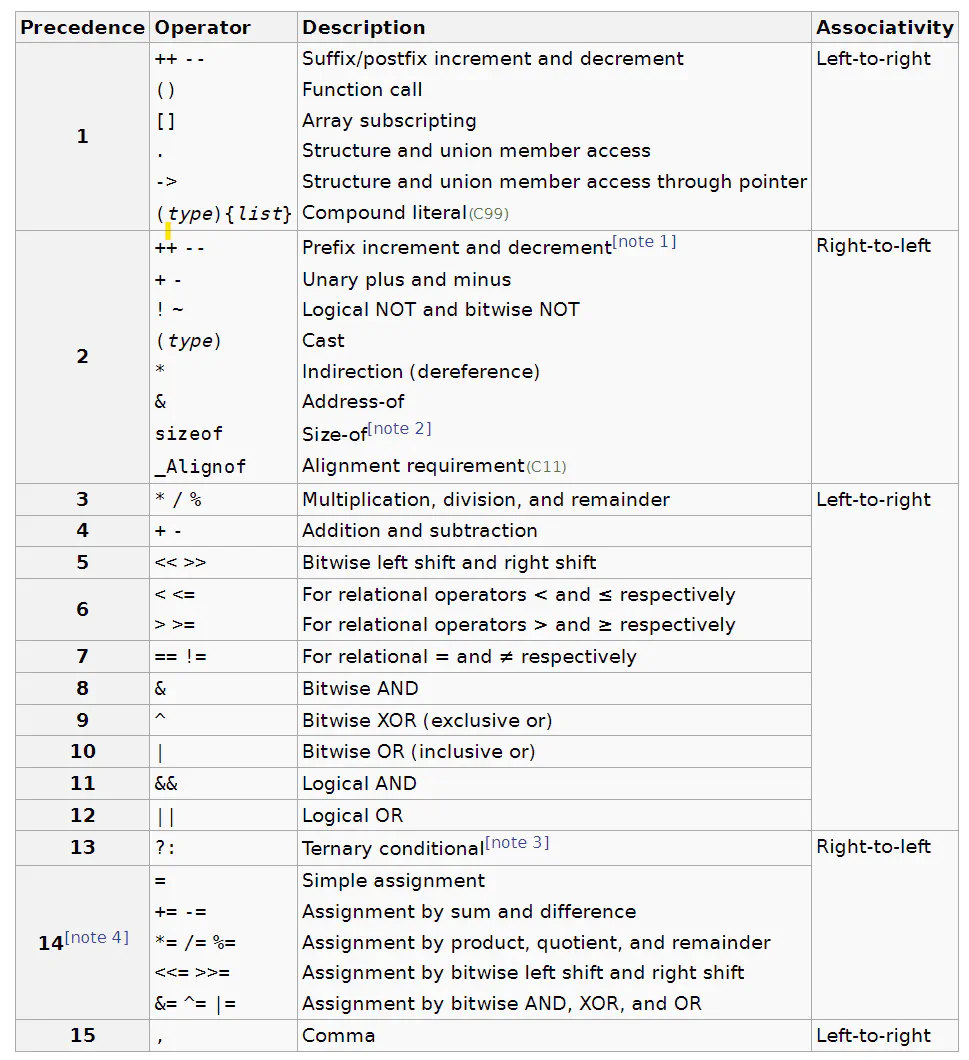
Left shift
- For left shifting, the most significant bit (MSB) is preserved (called sign-extension)
- For example:
00000000 00000000 00000000 00000101 >> 2 = 00000000 00000000 00000000 00000001
10000000 00000000 00000000 00000101 >> 2 = 11100000 00000000 00000000 00000001
Short Circuit
- For logical operators, expressions can “short-circuit” where a logical operator branches early. For instance:
 // assume x == 0 at this point
 if (x > 0 && f(x)) { ...}
- f(x) never gets evaluated here
Pre and Post Increment
-
Prefix first increments the variable, then assigns it
-
Postfix first assigns variable, then increments it
x = 0
y = ++x // y equals 1
z = x++ // z equals 1
Undefined Behavior
You can do things that are syntactically correct but logically nonsensical
x = x++;
x = x++ + ++x;
In cases like these, C standard leaves such cases as “undefined”. Which means the compiler does whatever the hell it want with that statement (assign an arbitrary value to a variable, crash, infinite loop etc.) This gives the compiler more flexibility to generate more efficient compiled code.
Expressions vs Statements
- Expressions always evaluate to a value. Statements do not
- Statements can contain expressions, but not evaluate to an expression themselves
b ? 42 : 66 // evaluates to 42 if b is non-zero; 66 otherwise
while (x) { f(); } // statement with expression inside of it
- Assignment is expression (ie. the act of assigning a values is associated with a value itself)
x=y=3; \\ Should be interpreted as x=(y=3);
- This is useful if a function returns an error code, you can see if the expression has a non-zero output
  if( (err = f()) ){
    \\ error handling code here
  }
Storage Classes
- Storage class denotes the lifetime of a variable: Either transient or permanent
- “Automatic” variables (ie local variables) in C are transient
- “Static” variables in C are permanent
Automatic Variables (Local)
-
Only exists within the the block were they are defined.
-
Stored on the stack in memory
Static Variables
- Three types:
- Global: These are defined outside any function
- Can use
externkeyword to ask compiler to look for definition of variable in another file
- Can use
- File-static variables
- Utilize the
statickeyword in C to specify a file-static variable. These variables are global only with respect to the file that they are in. Hence, you can’t reference the variable from another file viaextern.
- Utilize the
- Block-static variables
- You can use
staticvariables within a local block. Look at the following program:
- You can use
 int f()
 {
   static int i = 100;
   i++;
   return i;
 }
 int main()
 {
   for (int i = 0; i < 5; i++) {
     printf("%d\n", f());
   }
 }
The output of the program is:
101
102
103
104
105
Therefore, static within a block initializes only once, and from then on acts as a local variable restricted to the scope. This prevents functions outside the scope from changing the variable.
Memory Address Space
--------------- High address
    stack
---------------
    |
    V


    ^
    |

---------------
    heap
---------------
   static
---------------
string literals
  and code
--------------- Low address
Stack
-
The stack stores local variables of each function, then grows downward
-
The stack grows in size whenever a new local variable is declared, or a new function is called
-
The stack is not necessarily contiguously filled with variables (fir instance, need jump commands to return from end of function calls)
Data
- The data section is fixed at runtime
Pointers
-
Pointers hold memory addresses (they “point” to a location in memory)
- Use notation
int *pto declare a pointer
- Use notation
-
We can use
&operator to reference the address of a variable. Hence, we can assign the address of a variable to a pointer variable:
  int *p;
  int x = 1;
  p = &x;
- To dereference a pointer, you can use a
*operator:int y = *p- You an write to an address held by a pointer by dereferencing it on the LHS of an assignment
*p = 0- You can do funky things with this power like the following:
  int *p; // define pointer
  int y = 2; // define variable
  p = &y; // assign address of variable to pointer
  ++*p; // This means increment and update the value of *p (ie y)
  (*p)++; // This means first dereference p to get the value of y, then increment and update y
  *p++; // This, by contrast, in interpreted as *(p++), where the pointer gets incremented first, and the value at that memory address get dereferenced (this probably won't be equal to y)
- Pointers are typed, in that you can’t mix pointers without casting:
int i = 1234;
 double d = 3.14;
 int *pi = &i;
 double *pd = &d;
 // pi = pd; // compiler error
 pi = (int *) pd; // compiles, but pretty jank since you are asking the compiler to reinterpret the bits of one type as another type
Void Pointers
-
The exceptions to the casting rule are void pointers, which don’t require casting at all
-
Void pointers can point to any type, but they don’t tell use anything about what they point to (ie. what is the size of the data they point to)
-
Because the size isn’t known, C won’t let you dereference a void pointer. You need to first convert the void pointer to the appropriate pointer of the type you want
Faux Pass by Reference
- Since C is a pass by value language, we need to pass pointers to values instead of the values themselves to mimic pass by reference semantics:
  void swap(int *px, int *py){
    int temp  = *px;
    *px = *py;
    *py = temp;
  }

  int x = 1, y =2;
  swap(&x, &y);
NULL pointers
-
Compiler will normally complain if you assign a random number to a pointer. The only exception is if you assign a 0. This is called a NULL pointer. It is used to denote that a pointer doesn’t point to anything
int *p = 0- C defines a macro called
NULLthat should be used in place of 0 to denote a NULL pointer for more clarity
-
If you dereference a NULL pointer, you will segfault
Pointer Errata
-
A NULL pointer is the only pointer that will evaluate to FALSE when casted as a boolean. All others will evaluate to TRUE
-
A NULL pointer pointing to nothing is different from a pointer pointing to a variable holding 0
Dangling Pointers
- Never return a pointer which points to a variable on the stack. When the function goes out of scope, you will be pointing to garbage
  int *alloc_int(void){
    int i = 0;
    return &i;
  }

  int *p = alloc_int();
Arrays
-
Can declare and array with [] operator (like
int g[10]) -
Elements in an array are contiguous in memory
-
You can initialize an array as follows:
 int a[3] = { 100, 200, 300 }; // 100, 200, 300 assigned to a[0], a[1], a[2]
 int a[] = { 100, 200, 300 }; // same as int a[3] = { 100, 200, 300 };
 int a[3] = { 100 }; // same as int a[3] = { 100, 0, 0 };
 int a[100] = {0}; // initialize all 100 elements to 0
Pointer Arithmetic
-
Adding to a pointer will point to the address space that is sizeof(type_of_pointer)*n in memory space
-
Locations in memory to an array are equivalent to using a pointer that points to the first element of the array and then using pointer arithmetic
- You can access the address 1 past the last element of an array, as long as said value is not dereferenced
GUT of Pointers and Arrays
-
u[i] <==> *(u+i) -
You can tell the teacher was a physics major at some point…
Heap
-
If you need to return a pointer from a function, allocate the memory on the heap instead via malloc()
- malloc() allocates the amount of memory requested in bytes onto the heap. It returns a pointer to the beginning of a contiguous range of memory of that size
-
you must use free() to free the memory for other programs to use
- I mean, I guess you don’t have to, since the OS will free up any allocated memory once your program ends. But if the programs runs for a long time, all the memory will get sucked up by your program and things will crash
int *malloc_int_array(int n) {
  int *a = malloc(n * sizeof(int));
  if (a == NULL) {
    perror("malloc failed");
    exit(1);
  }
  return a;
  }
  int *squares = malloc_int_array(10);
  for (int i = 0; i < 10; i++) {
    squares[i] = i * i;
  }
  free(squares);
Heap Safety
-
Using memory beyond what is allocated (e.g., int *p = malloc(1);) is a memory error.
-
Reading from uninitialized memory (i.e., has not been written to since being returned by malloc()) is a memory error.
-
Using a pointer after it has been free()d is a memory error.
-
free()ing a pointer twice is a memory error.
-
Forgetting to free() a pointer you obtained from malloc() is NOT a memory error; it is a memory leak.
Strings
-
Strings in C are char arrays with a null terminator at the end
-
char hello[6] = = { ’h’, ’e’, ’l’, ’l’, ’o’, ’\0’ }; -
printf("%s\n", hello);will start from the pointer hello, interpret each byte as a character and print to screen, and keep doing this until it hits a null terminator
String Literals
-
Read only strings that reside in the same memory space as the source code
-
char *p = "abc"; -
String literals are treated as char arrays.
- They get converted to char pointers on compilation
-
If you are using a string literal to initialize an array, then they don’t get converted to a pointer
char a[4] = "abc";
-
An array of strings is represented as an array of pointers (ie pointers to pointers)
argv
int main(int argc, char** argv)argcis the number of command line arguments of program (including program name)argvis an array of strings of length argc+1 (last element is the NULL pointer. Acts like null terminator of string to signal end of array)argv[argc]; \\ always a null pointer
Constant Pointers
- Two ways to interpret the above:
int * const p = &x;- This is a pointer that always points to the same memory address. Kind of useless
const int *p = &x;- This creates a pointer to some data, and prevents that data from being modified (useful)
- This can be worked around by casting the const pointer to a regular pointer, then changing the value
 int x = 5;
 const int *p = &x;
 // ++*p; // compiler error
 int *p2 = (int *)p; // cast away const-ness
 ++*p2; // ok
- Used for documentation purposes in function pararmeters, denoting that function does not change value of pointer
Function Pointers
void qsort(void *base, // the array we want to sort
  size_t nmemb, // how many elements in that array
  size_t size, // the size of each element in that array
  int (*compar)(const void *, const void *)); // how to compare
- Last argument of qsort takes a function pointer as an argument
Parsing Function Pointers
-
Decleration follows usage
- All declerations (functions, variables etc.) are written as if the variable will be used in an expression
-
Case study:
int (*f3[5])(const void *v1, const void *v2);. Working from highest precedence, left to right- f3[5]: an array of 5 objects
- *f3[5]: an array of 5 objects that can be dereferenced
- ie. an array of 5 pointers
*f3[5](const void* v1, const void* v2): an array of 5 pointers to a function that takes in two pointers- Conceptually, *f3[5] can contain up to 5 functions with the stated arguments
int (*f3[5])(const void* v1, const void* v2): the result of any of the funtions of f3 returns an int
-
Can think of the above as “the spiral rule”
Structs
- You can group multiple data members together into a single object
  struct Point {
    int x;
    int y;
  };
- You can acceess members of a struct with the . operator
pt.x = 2;
-
Structs can be initialized in the following ways:
struct Point pt = {2,3}; struct Point pt2 = {.x=2, .y =3}; -
Structs can contain any fields of any types (including other structs), but they can’t include themselves
struct Node{
  void* value;
// struct Node; // This is not allowed
  struct* Node next; // This is allowed though
};
-
The size of a struct is not always simply the sum of it’s parts. Some padding occurs to maintain proper alignments (ie. addresses lie at a multiple of 8). The thinks to keep in mind:
- The first field of a struct is always at offset 0; No padding will ever occur prior ro the first field
- Padding can occur at the end of structs
- sizeof() returns byte size of the struct, including the paddings
-
Since structs can ge chonky, typically we pass them around via pointers
  struct Point { int x; int y;};
  struct Point pt;
  struct Point *p = &pt;
  (*p).x = 2 // (need () since  . has higher precedence than *)
  p->y = 3 // syntactical sugar for the above operation
  struct Point pt2[1]; // Declaring a single struct on the stack, but use pointers to access
  pt2->x = 2;
- The memory efficiency of struct pointers can be seen with sizeof operator
  struct Rec{ char[16] name; char[32] msg};
  struct Rec Chucky = {"hello", "world"};
  struct Rec* Lean = &Chunky;
  sizeof(Chunky) \\ 48 bytes
  sizeof(Lean) \\ 8 bytes
Unions
- unions are like structs, but all fields occuby the same memory location
- Struct memory layout
 +---+---+---+---+---+---+---+---+---+---+---+---+---+---+---+---+
 | .len = 3 | (padding) | .str = (points to "abc") |
 +---+---+---+---+---+---+---+---+---+---+---+---+---+---+---+---+
 |--------------------- struct MyString -------------------------|
- Union memory layout
 +---+---+---+---+---+---+---+---+
 | .as_long / .as_double |
 +---+---+---+---+---+---+---+---+
 |------- union LongDouble ------|
- This is useful if you have some data that can be multiple types, but only one type at a time (ex: interpreting a number as a long or as a double)
Typdef
- can use typedef keyword to abbreviate long types (purely syntactical sugar)
- Useful so that you don’t need to type out struct everytime. Also helpful for function pointers
  typedef struct { int x, int y;} Point;
  Point p;

  typedef int (*compar_fn_t)(const void *, const void *);
  void qsort(void *base, size_t nmemb, size_t size, compar_fn_t compar);
Libraries
-
Since there are a variety of problems with distributing source code, devs might ship .h and .o files of reusable code
-
An alternative to shipping out many .o files is to create an archive (.a) file
- use command
arto create an archive
- use command
ar rcs <.a file> <many .o files>
- r tells ar to add .o files to archive (or replace them if they already exist)
- c tells ar to create the archive file if it does not exist
- s tell ar to generate an index to the content to speed up linking step
- Archive files can be linked against directly:
gcc myprogram.o lib_file.a -o myprogram
-
By default, Linux systems look for header fins in
/usr/includeand archive files in/usr/lib -
For header files not in these locations, you need to tell the compiler were to look for .a and .h files
- -I flag tells compiler what directory to look for header files. You can optionally include a space after -I. Hence, the following are valid:
 gcc -I /some/path -c foo.c
 gcc -Isome/path -c foo.c
 gcc -I../some/path -c foo.c
- Similarly, the -L flag specified where to look for .a files. Follows the same formating as -I
- In addition to -L telling you were to find a library files, the -l flag states what library to look for. For instance, if you run the following:
gcc -Lsome/path foo.o bar.o -lbaz
- the linker will look for libbaz.a in the standard path, as well as
/some/path - Writing
-l<lib-name>will tell the linker to link inlib<lib-name>.a - The way that these flags work is that they append the specified path to the standrard path, and then look through all paths
- You can pass in multiple -I, -L and -l flags to specify multiple paths/libs
- The -I and -L must come before any .o files, while the -l must come after
- In make, the -I flag is associated with CFLAGS, the -L is associated with LDFLAGS, and -l is associated with LDLIBS
IO
Standard I/O
- Three main channels of communication for C programs: stdin, stdout, sterr (referred to by their file descriptor numbers as 0,1,2 respectively)
Stdout
- Where output normally gets piped to. C provides a variety of functions to write data to stdout:
- printf(): print formatted text to stdout
- putchar(): write an unsigned char to stdout
- puts(): writes a string, plus a newline, to stdout
Stdin
-
To read from stdin, use scanf() (read formatted text).
- Scanf is kind of janky, so use sparingly
-
Other ways to read are getchar() (sometimes useful for reading in a single character) and gets() (never use this!!!)
-
stdin is seperate from a program’s arguments: arguments are stored in argv prior to the program running, while scanf() and friends read input during program execution
Stderr
-
Since we want to be able to seperate errors from normal output, we have stderr as an additional stream
-
use fprintf() to write to stderr. Need to provide an additional argument stating stream
#include <stdio.h>
 int main(int argc, char **argv) {
 if (argc < 2)
 fprintf(stderr, "Warning: no arguments given.\n");
 else
 fprintf(stderr, "%d arguments given.\n", argc - 1);
 for (int i = 1; i < argc; i++)
 fprintf(stdout, "%s\n", argv[i]);
 // ^same as writing printf("%s\n", argv[i]);
 return 0;
 }
Redirection
- Can use
>and>>to redirect stdout.>will overwrite contents of a file>>will append to a file
./printf-test > myfile // Overwrite myfile
echo "42" >> myfile // append to file
- Similarly, one can use
<to redirect a file into a program’s stdin
echo "42" > file
./scanf-test < file
-
If you want to redirect stderr, we use
2> -
You can also redirect stderr to stout with
2>&1(in words: redirect stream 2 (ie. stderr) to where stream 1 (stdout) is going)- Order matters for redirection
Pipes
-
Can use
|to connect stdout of one program to stdin of another program -
Suppose that you want to count the number of lines in a directory of text files
cat *.txt | wc -l
-
This runs cat *.txt, while writes all the contents of all .txt files to stdout. This gets piped to wc (word count). The -l flag states to count the number of lines
-
You can chain as many pipes as you want, and even use redirection (ex: the following counts unique words in all .txt files and pipes output to lecture-words)
cat *.txt | tr ’ ’ ’\n’ | sort | uniq > lecture-words \\ lecture-words has each line be a unique word
wd -l < lecture-words // use lecture-words as stdin to wc
Files
-
Everything is a file
- keyboard: a file you read from
- console: a file you write to
- camera: a file you read from
- motor: a file you can read from and write to
- Network connections are files that you can read from and write to
-
More specifically, a FILE is a sequences of bytes with a position
- Certain FILE pointers might allow you to change the file stream position, or only give you read access (as some examples)
-
FILE is an opaque type: we don’t care how it is implemented
- What we care about is if we can create pointers to objects of type FILE
- This pointer represents a file which can be passed to library functions
-
stdin, stdout, and stderr are file streams which are always available. To access other streams (like a text file, or some hardware), you need to use fopen()
-
fopen() return a non-NULL FILE pointer on success, and returns NULL on failure
- FILE fopen(const charpathname, const char *mode)
- Mode can take a variety of options:
- “r” is for reading. Fails if files doesn’t exist. Stream starts at beginning of file
- “w” is for writing. If files doesn’t exist, create it. If file does exists, then overwrite it. Stream starts at beginning of file
- “a” is for append: Create file is it doesn’t exists. Otherwise, add to end of file. Stream is positioned at the end of the file before each write operation
- “r+”: Open file for reading and writing. Fails if file doesn’t exists. Stream at beginning
- “w+”: Open fie for reading and writing. Creates file if it doesn’t exists; overwrites file if it does. Stream at beginning
- “a+”: open file for reading and appending; create file if it does not exist, keep old content if it does. Stream is positioned at end of file before each write operation. Initial stream position is OS dependent
- For all of the above, you can add “b” to specify that you want to work with a binary file
- For UNIX based systems, this makes no difference
- For Windows, adding b disables the translation of “\r\n” to “\n”. Windows uses “\r\n” as a newline
-
use fclose(FILE* fpointer) to close a file
- Once you fclose a FILE pointer, you shouldn’t use it again without fopen() again
-
to write to any FILE pointer, use fprintf()
 fprintf(stdout, "write to stdout\n");
 fprintf(stderr, "write to stderr\n");
 fprintf(fp, "write to myfile.txt\n");
-
Can also use fputs() to write a string, or fputc() to write a char
- fputs() will keep putting characters into a stream until it hits a null terminator
- The null terminator will NOT be put into the stream
- fputs() will keep putting characters into a stream until it hits a null terminator
-
To write arbitrary bytes to a file stream (including null bytes), need to use fwrite()
- size_t fwrite(const voidp, size_t size, size_t n, FILE file)
- *p denotes what memory address to start reading from
- size is how big each object is that you want to write
- n is how many objects you want to write
- file is the file object you want to write to
- fwrite() returns the number of objects successfully written. This number will be less than n if unsucessful
- size_t fwrite(const voidp, size_t size, size_t n, FILE file)
Blocking and Reading
-
When you ask for something that can’t be returned immediately, the OS blocks your process until it can serve the request
- Say you ask for input from stdin, but there is nothing in the buffer
-
Three options to reading:
- int fgetc(FILE* fp)
- reads in a single character from fp and returns as int. If not character can be read, returns -1 (denoted as EOF in stdio.h)
- char fgets(charbuffer, int size, FILE * fp)
- reads at most size-1 characters into buffer
- stops when a newline is reached or the end of the buffer is reached
- returns NULL on EOF or error
- reads at most size-1 characters into buffer
- size_t fread(void p, size_t size, size_t n, FILEfp)
- reads n objects, each n bytes long, from file into memory at *p
- returns number of objects sucessfully read. If less than n, we have an error
- int fgetc(FILE* fp)
-
For all of the above, can call feof() or ferror() to see if EOF was reached or an error occured while reading
-
EOF denotes “end of file” and is used for when you can’t read anything else from a stream
- EOF only occurs when you try to read PAST the end of a stream
-
To distinguish between EOF and an error, feof() and ferror() are used. These read a global flag somewhere which gets set whenever EOF or a file error gets triggered respectively
-
EOF on stdin means that there is no more input to read
- Can trigger with Ctrl-D
- When EOF is triggered in shell, then you are logged out
Buffering
 printf("hello...");
 sleep(3);
 prinf("world\n");
-
The above will not print “hello…” until after the sleep command. This is because printf is buffered (just like fputc(), fputs(), fwrite())
- This means that will buffer bytes given to a stream, and wait until a newline is reached, or if the buffer gets full, to push to a stream (called line buffering)
- For efficiency sake: It is more efficient to write a large chuck than many equivalent small chucks
- This means that will buffer bytes given to a stream, and wait until a newline is reached, or if the buffer gets full, to push to a stream (called line buffering)
-
stderr is not buffered by default
-
all other files are block-buffered by default: they don’t write to disk until the buffer is filled
-
To immediately write to a file, use fflush(FILE * fp) to flush the associated buffer immediately
-
To make a stream unbuffered, use setbuf(FILE fp, const void buf) with buf=NULL
File Seeking
- For some FILE pointers, we can change the current position of the underlying stream using fseek()
- int fseek(FILE *fp, long offset, int whence)
- *fp is the stream we are working with
- offset is how many bytes from whence you want to set the new position
- whence is what byte you want to start at. Should pass one of the following:
- SEEK_SET: start of file
- SEEK_CUR: current position
- SEEK_END: end of file
- fseek() doesn’t work for some streams (stdout is one of them. You can’t unprint something)
- int fseek(FILE *fp, long offset, int whence)
Formatted IO
-
For formatted output like printf() and fprintf(), can specify conversions to string, width, and precision. Common string conversions are:
- %d: int
- %u: unsigned int
- %ld: long
- %lu: unsigned long
- %f: double
- %g: double (trailing zeros not printed)
- %s: string (char *)
- %p: memory address (void *)
-
The signatures look like: int printf(const char *format, …)
- The … means a variable number of arguments are allowed
-
There are other functions that do formatting:
- int scanf(const char *format, …)
- Read in from stdin according to format into variadic arguments
- int fscanf(FILE stream, const charformat, …)
- Read in from stream according to format into variadic arguments
- int sscanf(const char input_string, const charformat, …)
- Parse input from input_string instead of stdin into variadic arguments
- int sprintf(char output_buffer, const charformat, …)
- Write output to output_buffer instead of stdout using variadic arguments
- Output_buffer is assumed to point to enough memory. Will buffer overflow if this assumption does not hold int snprintf(charoutput_buffer, size_t size, const char *format, …)
- int snprintf(char output_buffer, size_t size, const charformat, …)
- A safer version of sprintf(). writes at most size bytes (including null terminator)
- int scanf(const char *format, …)
-
The C standard library has the following convention
- ‘f’ at the beginning means the function takes a FILE* as an argument
- ’s’ means that the function produces a C-style string (ie. null-terminated)
- ‘f’ at the end stands for “format” (ie. these functions require a format string of some kind)
- ’n’ in string-related functions means a size limit of n bytes
Inspecting binary files
- The poor man’s version of a hexdump
 int b;
 while ((b = fgetc(fp)) != EOF)
 printf("%x\n", b);
-
Actual tools in UNIX for printing binary files
- od (octal dump)
- hd
- xxd (hex dump)
-
All of these programs output the byte offset in the first column, the next couple of bytes, 2 bytes (4 hex digits) at a time, and the the printable version of the bytes (if possible)
$ xxd myadd.o | head
 00000000: 7f45 4c46 0201 0100 0000 0000 0000 0000 .ELF............
 00000010: 0100 3e00 0100 0000 0000 0000 0000 0000 ..>.............
 00000020: 0000 0000 0000 0000 2806 0000 0000 0000 ........(.......
 00000030: 0000 0000 4000 0000 0000 4000 1500 1400 ....@.....@.....
 00000040: f30f 1efa 5548 89e5 897d fc89 75f8 8b55 ....UH...}..u..U
 00000050: fc8b 45f8 01d0 5dc3 6b00 0000 0500 0108 ..E...].k.......
 00000060: 0000 0000 0200 0000 001d 0000 0000 0000 ................
 00000070: 0000 0000 0000 0000 0000 1800 0000 0000 ................
 00000080: 0000 0000 0000 0361 6464 0001 0305 6700 .......add....g.
 00000090: 0000 0000 0000 0000 0000 1800 0000 0000 ................
Endianness
Suppose we have the following program:
 FILE *fp = fopen("x-file", "w");
 assert(fp);
 int x = 0x12345678;
 fwrite(&x, sizeof(x), 1, fp);
 fclose(fp);
This ostensiably will write the hex integer 0x12345678 to the file x-file in the following order: 0x12, 0x34, 0x56, 0x78
Running the xdd yields:
$ xxd x-file
 00000000: 7856 3412
It shows up in the reverse order, namely: 0x78 0x56 0x34 0x12
- Integers are stored in memory in two manners: little endian and big endian
- little endian means that the BYTES are stored from least significant to most significant. Not the bits
- Suppose that we have
0x0000003(ie0b00000000 00000000 00000000 00000011)- This gets stored as
00000011 00000000 00000000 00000000 - This does NOT get stored as:
11000000 000 00000 00000000 00000000(this is0xc0000000, NOT0x00000003)
- This gets stored as
- Suppose that we have
- big endian stores the bytes fromo most significant to least significant
- little endian means that the BYTES are stored from least significant to most significant. Not the bits
- Most computer are little endian (for a variety of reasons…)
Network byte order
-
If little endian computers want to communicate with big endian computers (say over the internet), there needs to be a standard communication protocol
-
One important example is the 4 byte IPv4 address. The Internet Protocol specifies that IP address ( and all other protocol data in integers) must be read in big endian
-
There are macros in order to do this translation on little endians systems:
- uint32_t htonl(uint32_t hostlong)
- uint16_t htons(uint16_t hostshort)
- uint32_t ntohl(uint32_t netlong)
- uint16_t ntohs(uint16_t netshort)
-
‘h’ means “host”, ’n’ means “network”, ’l’ means 32-bit integer (ie. an int) and ’s’ is for a 16-bit integer.
-
The host byte order refers to the byte order of the system that you are on. Hence, the above do nothing on big-endian systems
- This allows a program to work on both types of systems without modifying source code (code only needs to be rebuilt)
Forks
-
Each instance of a running program is called a process, and is identified by a postive number called the process ID (PID)
-
Each program can access it’s process id with getpid() function, and the parent id with getppid()
- The ancestor of all processes on UNIX is the init process, with PID of 1
- The first process that is run on boot
- The ancestor of all processes on UNIX is the init process, with PID of 1
-
To spawn a child process, use the fork() command. The processes will run concurrently from then onwards
- The entire address space of the parent is copied over to the child; By the end of fork(), the two address spaces are seperate from each other and can evolve independent from each other
- fork() can be called multiple times by a parent, and child can be spawn it’s own children
Reaping Children
-
Upon termination, every process returns a status code of some kind
- By default, this is 0 for sucessful running
- Exit immediately with the exit() function
-
A parent can wait for it’s child to finish with waitpid() function (ie. reaping the process):
pid_t waitpid(pid_t pid, int *wstatus, int options);
-
Returns the PID of the child process that is reaped, or -1 on error
-
pid is the is what child process to wait for
- < -1 means wait for any child process whose process group ID is equal to the absolute value of pid
- -1 means wait for any child process
- 0 means wait for any child process whose process group ID is equal to that of the calling process at the time of the call to waitpid().
-
0: means wait for the child whose process ID is equal to the value of pid
- All other values wait for that specific process (Can typically get this number from return of fork())
-
wstatus holds the exit information the return process
- Can wrap with WEXITSTATUS() macro to extract the status code from wstatus
- Can pass in NULL if you don’t care about exit code
-
options can be one of the following values:
- 0: the default behavior. Waits for a child process and blocks parent while waiting
- WNOHANG: Returns immediately if child processs
- There are others, but we don’t care about those in this class
If a child process gets terminated, but is not reaped, it is called a “zombie”
- This matters since the OS contains metadata about all processes. If the process is never reaped, this metadata lingers and takes up unnecessary resources
- If a parent terminates before a child does, the child is an “orphan”. All orphans are adopted by the ancestor and get automatically reaped when terminated. Used to create long-running processes called “daemons”
exec()
When fork() is called, the exact same program as the parent is run. To have children run different programs, can use exec() family of functions
- execl() replaces the program that is currently running with another program. Namely, the new program retains the same PID and the same parent process, but the memeory is gutted
int execl(const char *pathname, const char *arg, ... /* (char *) NULL */);
-
Pathname is the path to the new program
-
The rest of the arguments are the command line arguments
- There MUST be a char* NULL at the end of the function call
UNIX
-
OS kernel is the software “between” the hardware an other software
-
kernel allows other programs to pretend:
- That they have exclusive use of CPU
- That they have exclusive use ofa large linear memory address space
- hardware devices from different vendors respond to a uniform set of commands
Users and Groups
-
All users have a unique username and user IDd (UID). Users can also belong to one or more groups
-
Can use command $id$ to get what your UID is. root user has UID of 0
-
Each file has certain permissions with regards to the user, groups, and the world
-rwxr-x--- 1 abc1234 student 211 Oct 31 01:03 script.sh
-
The left most character specifies if the file is a directory
-
rwx refers to read, write or execute permissions. In groups of 3, going from left to right, specify the user, group and the world permissions
- r allows read access (ie can run “ls”)
- w allows one to modify the contents of a directory
- x allows full access to items (ie. can use “ls -l”)
-
Can specify permissions of a group with chmod. Can either be symbolic
chmod go-x student.sh # Tells chmod to turn off execute permission for group and the world
chmod root public.txt # change owner to root
- Or you can use octal numbers
chmod 755 student.sh
-
Common permission numbers is 600, 644 and 750
-
Similar rules apply to directories. Gotchas here are that you need execute permission to run something like
ls -l, and you also need execute permission to enter or go past a directory
Shell Scripts
-
use “#!\bin\bash” to specify a text file as a shell script
- Can replace “\bin\bash” with whatever shell interpreter you want
-
need to enable execute (+x)
-
Most shells have some programming language built into it (loops, branches, recursion, the whole nine yards)
TCP/IP
There are 5 layers of the internet
| Layer | Purpose | Examples |
|---|---|---|
| L5: Application | Interpret transported Data | HTTP, SMTP, SSH |
| L4: Transport | Manage flow of Network Packets | TCP, UDP |
| L3: Network | Route packets of networks of links | IP |
| L2: Link | Send packets over physical connections | Ethernet, Wi-Fi |
| L1: Physical | Interpret transported Data | IEEE 802.3 |
-
Internet applications treat L4 and below as a black box, since most people don’t care about how these layers work, just that they give the correct stream of data
- L1 and L2 layers is the concern of electrical engineers
- Unless you are programming routers, you don’t care about L3 and L4
-
TCP is the representative protocol of L4, and IP is the only protocol of L3, so the internet protocol as a whole is sometimes called TCP/IP
- TCP/IP is two-way and reliable (this means that both nodes can send and receive, and that as long as two nodes are connected, bytes sent between the two will never be dropped, duplicated, corrupted, or reordered)
-
Hosts are identified via IP address, a 4(or 16) unsigned integer for IPv4 and IPv6 respectively
- Formatted as “dotted-quad” notation
- e.g.: 34.145.159.110 and 127.0.0.1
- Can also use a hostname, which is a domain name that gets translated to an IP address using Domain Name System (DNS)
- Formatted as “dotted-quad” notation
-
Different programs running on the same hosts are distinguished by port numbers (16-bit integer ie. max number of ports is 65.635)
- Ports below 1024 are typically reserved for well-know applications
netcat
-
nc(ie netcat) is a command line tool that exposes TCP/IP connections to stdin/stdout -
On the server side, you can listen for incoming traffic with -l:
nc -l <port-number>- Can think of this as feeding the network input to stdin (and ignoring local stdin) and pushing to stdout
-
On the client side, you can specify outgoing traffic via:
nc <hostname-or-IP-address> <port-number>- Takes stdin from local and routes stdout pushes to network through a port (skipping local stdout)
-
Running one machine in server and one in client allows the stdin of client to appear on the stdout of server
-
Additional useful flags include:
- -N: close the network connection upon EOF
- -C: translated \n to \r\n. Useful for interacting with protocols which expect lines ending in \r\n (e.g. HTTP)
File Descriptors
- UNIX represents files objects as raw integers. The C Standard library wraps these integers with meta data for easier handling.
- stdin, stdout, and stderr are represented by files 0,1,2 respectively. As such you can use raw UNIX commands instead of standard library functions to access stdin and stout (ie. you can use read() instead of fread() and write() instead of fwrite())
Sockets API
-
In this course, sockets represent a file (or an endpoint in networking terminology) which represents a reliable, bidirectional connection such as TCP. This socket can be manipulated just like a file (read, write, close etc.)
-
You can create a socekt as follows:
int socket(int domain, int type, int protocol)
-
Domain specifies the protocol family (for this class, use AF_INET, which specifies IPv4)
-
type specifies the type of protocol (e.g. TCP uses SOCk_STREAM)
-
protocol specifies the specific protocol within the domain of that type (use 0 for the default on)
Connect
- We use connect() to connect a socket to another address
int connect(int sockfd, const struct sockaddr *addr, socklen_t addrlen);
-
sockfd is the return integer from socket(…)
-
sockaddr is a struct with defines an address, a port annd protocol family
  sa_family_t  sin_family; //typically either AF_INET or AF_INET6
  uint16_t sin_port; // port in network byte order
  struct in_addr sin_addr; // internet IP address structure
- For this class, just set sa_family_t to AF_INEt
- sin_port is network order (ie big-endian).
- use htons() and ntohs() to convert to and from network order
- The anciliary struct in_addr is just an integer.
struct in_addr{
  uint32_7
}
- This is a struct to account for the fact that different operating systems might represent the address length differently. On UNIX, it is just a 32 bit integer. On Windows, it is much more complicated
As an example:
 // Use 3157 as an example port number:
 uint16_t ip_port = 3157;
 // Construct 34.145.159.110 as a 4-byte integer:
 uint32_t ip_addr = 34 << 24 | 145 << 16 | 159 << 8 | 110;
 struct sockaddr_in addr; // Define socket address struct
 addr.sin_family = AF_INET; // Set internet address family to IPv4
 addr.sin_port = htons(ip_port); // Set port number, converting to big endian
 addr.sin_addr.s_addr = htonl(ip_addr); // Set IP address, and convert to big endian
Bind, Listen, Accept
- On the server side, we need to bind() the socket to and address and a port, listen() for incoming connections, and accept() said connections
int bind(int sockfd, const struct sockaddr *addr, socklen_t addrlen)
- sockaddr and socklen_t are the same as in connect()
- You can think of bind() as the server analog to connect() on the client side
int listen(int sockfd, int backlog)
- sockfd comes from socket(), and backlog dictates the max queue size of client requests you are willing to serve
int accept(int sockfd, struct sockaddr *addr, socklen_t *addrlen)
- returns client socket number. All subsequent reads and writes should be to client socket number and NOT server socket number
- By default, this function is blocking
Send and Receive
-
Can use raw UNIX library of like open and write to manipulate the socket
-
Can also use send() and receive(), while provides more control
int send(int sockfd, const void *buf, size_t len, int flags)
- On the socket of identity sockfd, receive len bytes in buf through the socket. flags sends additional metadata if needed (use 0 if just writing to socket)
int recv(int sockfd, const void *buf, size_t len, int flags)
-
Same as send, but receiving data into buffer
-
Can wrap sockets into files via fdopen()
FILE *fdopen(int fd, const char *mode)
-
Calling fclose on the resultant file will also close the underlying socket
-
You should open two file pointers if you are reading and writing to a socket; Use the dup() command to copy the socket. Both files must be closed by the end
HTTP/1.0
URLs
-
URL is short for Uniform Resource Locator
-
An example is: http://example.com:80/index.html
- http refers to the protocome being used (could be https)
- example.com is the domain name (or ip address)
- 80 is the port number (since this is normally 80, this is typically left off)
- index.html is called the URI (Uniform Resource Identifier), and specifies what resource the client wants from the server
- Server typically preappend the URI with some path (called the web root) where all the resources live at
-
If server directly returns the file, then it is called a static web server. If the server generates the contents dynamically (say, querying a database and return that resource), then it is a dynamic server
Command line HTTP requests
- Utilities that implement the HTTP protocol that can be used from the command line are curl and wget
- curl write the response from a server to stdout
- wget write the response to a file (by default, the file has the same name as the URI of the site)
GET Requests (Client)
-
Using GET, the client downloads a resource from the server
-
A GET request consists of a request line, followed by zero or more headers, and then ends with a blank line
-
The request line is formatted as follows (each argument is space seperated):
<method> <resource> <protocol>- In this case:
- method = GET
- resource = index.html
- protocol = HTTP/1.0
-
The header are formatted as follows (single space between):
<header-name>: <header-value>
-
Every line, including blank line, must end in “\r\n”
GET Requests (Server)
-
In response to a GET request, the server response with a status line, zero or more headers, a blank line, and then the data
-
Each line (other than the data) ends with \r\n just like the GET requests
-
The status line is formatted as follows:
<protocol> <status-code> <reason-phrase>- for example: HTTP/1.1 200 OK
-
Header lines and blank lines are the same as request side
-
the data does not need to be terminated with \r\n. Treat the data as arbitrary binary data
Status Codes
-
Status codes are for the cases were a server can’t fulfill a client’s request
-
The first digit of the request denotes the category of the status code, while the subsequent digits denote the specific scenario
-
2xx: the request was successful
- 200 OK: the standard response for indicating success
-
3xx: the client must take further action for the request to be fulfilled
- 301 Moved Permanently: the request should be directed to another URI
-
4xx: there was an issue with the client’s request
- 400 Bad Request: there was a problem
- 403 Forbidden: the client doth not have necessary permissions
- 404 Not Found: the client requested something that doth not exist
-
5xx: there was an issue with the server
- 500 Internal Server Error: an unspecified server-side error
- 501 Not Implemented: the server does not implement the request method